
Back to Projects
Project 06 / 15

Project 06 · Game

My Zombie World

A zombie horde game of hexagonal areas, where every human bitten joins the horde.

  • Horde
  • Merge
  • Mobile
  • Games
Genre:
Horde Exploration, Merge
Scope:
Level Design · UI/UX & Icons · Materials & Shaders · VFX & Juice · 3D & Optimization
Development Time:
1 Month
Team Size:
2
Tools:
Unity
My Zombie World trailer
0:00 0:00

Project Resume

Project resume

01

Overview

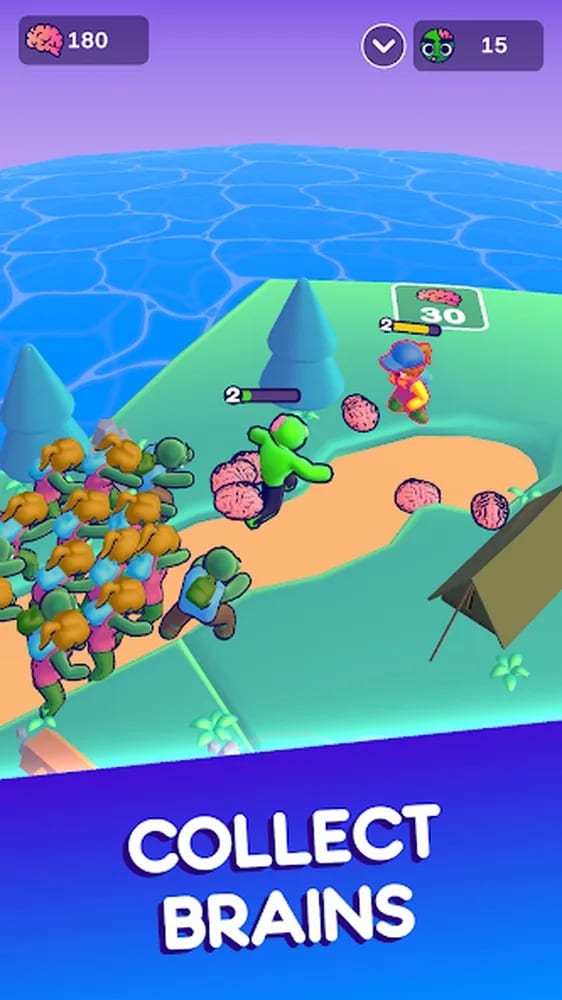
A zombie horde exploration game. Players bite humans to grow the horde, collect brains to unlock hexagonal areas and merge zombies into stronger ones, building a zombie empire.

  • Platform Mobile
  • Team Size 2
  • Duration 1 Month
  • Engine Unity

Key Features

  • Bite humans to grow the horde and earn brains
  • Unlock hexagonal areas with the brains you collect
  • Push barriers with a horde big enough to move them
  • Merge zombies two by two into stronger levels
  • Level up Zé, from a plain zombie to a crowned king
  • Build bridges with wood and rescue lost zombies

My Role

Game Artist & Level Designer

Reworked the look of the game, from materials, shaders and VFX to all of the UI and icons, and organized the level design of every area.

  • Made the materials, outline shader and all of the VFX
  • Organized the elements of every level to populate the map
  • Designed all of the UI, UX, icons and store images

  • Level Design
  • UI/UX
  • Materials & Shaders
  • VFX
  • 3D & Optimization
02

Design Brief

67 Bits had a zombie horde game where players bite humans, grow a horde and unlock hexagonal areas with brains. The game needed to look better and read better on a phone, with a colorful identity where every level of zombie and every human stands out, levels populated with purpose, a clear UI and a smooth run on mobile with many zombies on screen.

Constraints

  • A colorful identityExtremely colorful materials, with a visual identity for every level of zombie.
  • Read at a glanceFriend, foe, zombie level and resources clear in one look on a small screen.
  • Levels with purposeEvery element of each area placed to populate the layout and guide the horde.
  • A horde on a phoneA big horde on screen at once, running smoothly on mobile devices.
03

Design Goal

I wanted the horde to feel as strong as it is. Every bite had to pay at once, with a brain and a new zombie, and every merge and level up had to show on screen. Color had to explain the game, the level of each zombie, the danger of each human and where each resource lies, so players read everything in one look and never lose a brain along the way.

From the first bite to the crowned king

Easy to bite. Hard to stop growing.

  1. BiteBite humans to earn brains and new zombies.
  2. MergeMerge the horde into stronger zombie levels.
  3. RuleCrown Zé and rule every hexagonal area.

Player Experience Pillars

  • Color with a jobEvery color has a meaning
  • Friend or foeRed for enemies, black for allies
  • A horde that showsLevel and size read at a glance
  • Nothing lostLight points to every resource
  • Always a next areaBrains open the way forward
04

Design Solution

I reworked the look of the game around readability. Materials became extremely colorful, and each level of zombie got its own color, size and clothes, while humans got a color scale for their power. An outline shader separates enemies in red from allies in black, beams of light point to every brain and pile of wood, and the levels were organized so the horde always has a next target. The UI, UX and icons follow the same language, and optimized models keep it all smooth.

Key Design Choices

  • Color by levelEach merge gives a zombie a new color, a bigger body and new clothes, so the horde shows its strength.
  • Red means enemyThe outline shader draws humans in red and allies in black, so players pick targets inside any crowd.
  • Light on resourcesBeams of light point to every brain and pile of wood, so players find each resource from far away and lose none.
  • Populated levelsHumans, barriers, wood, traps and healing zones fill every area, so the horde always has a next target.
  • Built to runOptimized models, occlusion culling and clean prefabs keep a colorful world smooth on mobile.
05

World & Visual Identity

A comic zombie world of hexagonal areas, bright and extremely colorful, bent round by a curved world shader. Zé leads a horde that changes color as it merges, humans climb from blond civilians to tanks and helicopters, and light points the way to every brain.

Visual Principles

  • Extremely colorfulSaturated materials that all match each other
  • Color by levelEvery zombie level has its own color and clothes
  • Red for enemiesRed outlines for humans, black for the horde
  • Light as a guideBeams of light over every brain and pile of wood
  • A curved worldA round world that bends away from the camera
06

Results & Learnings

Results

  • 120K+ downloadsPassed 120K downloads on Google Play and became the most successful game of the studio, with much of its look built on my materials and icons.
  • Three selectionsSelected for Gamescom Panorama Brasil 2023, the Google Play Indie Games Fund 2023 and the Google Play Indie Games Accelerator 2024.
  • Played by creatorsPlayers recorded their own gameplay videos of the game, and the most watched ones reached 278K, 89K and 70K views.

Learnings

  • Color explainsColors, outlines and light explained the game better than text, from the level of a zombie to the place where a resource lies.
  • One visual systemMaterials, VFX and UI worked as one language, so every new piece fit the world and read the same way as the rest of the game.
  • Art that runsOptimizing models and scenes next to the art kept a colorful world with a big horde running smoothly on mobile, so the look never cost performance.

Media

The work, up close

Project gallery · 11

Roles

Roles & Responsibilities

Level Design

  • Organized the elements of every scene to populate the layout
  • Placed humans, barriers, wood, traps and healing zones
  • Tuned the level design parameters across the hexagonal areas
  • Placed wood piles and lost zombies across the map to explore

UI/UX & Icons

  • Designed all of the UI and UX of the game and its menus
  • Created every icon of the game in the same colorful language
  • Designed the HUD for zombies, brains, wood and horde levels
  • Made the store images that present the game on Google Play

Materials & Color

  • Created all the materials, extremely colorful by design
  • Gave each level of zombie its own color identity, from green up
  • Separated the colors of the humans into a clear scale of power
  • Matched the materials of every element in the levels to each other

Shaders & Lighting

  • Made the outline shader, with red for enemies and black for allies
  • Tuned the curvature of the curved world shader and improved it
  • Made the water shader of the game to fit the colorful look
  • Set up the lighting of the levels to match all the materials

VFX & Juice

  • Created all of the VFX of the game, for every action
  • Added beams of light over every brain and pile of wood
  • Added visual feedback and a lot of juice across the whole game
  • Put the look of the game together to make it more beautiful

3D & Characters

  • Built the versions of the zombies that grow taller and stronger
  • Made changes to the 3D models of the characters for every level
  • Changed the clothes of the zombies to highlight each level
  • Made and organized the 3D assets used to populate every area

Tech Art & Optimization

  • Created all the prefabs and organized the Unity project
  • Improved and optimized the 3D models of the map and characters
  • Set up occlusion culling with the 3D team to cut what is not seen
  • Helped the team optimize the game to run smoothly on mobile

Collaboration

  • Coordinated the programmer to solve issues in my work
  • Helped the team improve a game already in production
  • Worked with the 3D team on models and performance
  • Supported the team on game design and level design

Full Case Study

My Zombie World Case Study

Core Loop

  1. Bite a human
  2. Collect brains
  3. Grow the horde
  4. Push barriers
  5. Merge the horde
  6. Unlock new areas

The loop is built around a single bite. Zé starts alone on an island facing one human, and every human he bites pays twice, with a brain to spend and a new zombie for the horde. Brains pay for new hexagonal areas, and the size of the horde is its strength, so a rock or a car in the way only moves when enough zombies push it. Wood found across the map builds the bridges that close some paths. At the graveyard the horde merges two by two into stronger zombies, and brains level Zé up, so the next humans fall too, even the ones with guns, bazookas and tanks. The cycle never changes, only its scale, as every new area asks for a bigger and stronger horde to take it.

Visual Language

Feature Introduction

Colors that explain the game

The visual rework was the center of my work on My Zombie World. The materials are extremely colorful, and every color does a job, telling the player what they are looking at. I made the materials of every element in the levels to match one another, set up the lighting and the water shader, and built the look of the game.

Color carries the progression. Each level of zombie has its own color, from the original green up, so players read the level of any zombie at a glance, and the humans follow their own color scale of power. The outline shader draws enemies in red and allies in black, so friend and foe are clear in the middle of a crowd.

Light guides the eye too. Every brain and pile of wood gets a beam of light seen from far away, a curved world shader bends the map away from the camera, with a curvature tuned by hand, and the UI and icons follow the same colorful language.

Design Principles

  • Friend and foe must be clear in a single look, even when the horde runs into a group of humans and both sides mix on the screen
  • Every color does a job, from the level of a zombie to the power of a human, so the look of the game explains its own rules at a single glance
  • Light marks what the player should collect, color marks who they should bite, and nothing else in the scene competes with either of them
  • Every material in a level matches the rest, so the whole scene reads as one extremely colorful world, from the ground to the UI

Feature Breakdown

The rules behind the look

01 Human RanksA color scale for the power of humans
01

Human Ranks

A color scale for the power of humans

Humans have their own ranks of power, from the first ones, white with blond hair, to humans with guns, bazookas, war tanks and helicopters. Their colors change along the way, so the look of a human tells how dangerous it is, and players read at once which groups their horde can take on right now.

Function

Let players read the power of every human before the fight starts

Design Approach

Decisions made:

  • Set a color scale that shows the power of every rank of human at a glance
  • Start the scale with the very first civilians, white humans with blond hair
  • Shift the colors as humans gain guns, bazookas, tanks and helicopters
  • Keep every rank of human readable from far away across a crowded area

Player Impact

Allowed players to...

  • Judge a fight early by reading the power of each human from its look
  • Leave the strongest groups for later and grow the horde to take them on
  • Notice that stronger humans are near the moment a new color shows up
  • Choose their fights by rank, from civilians up to tanks and helicopters
02 Curved WorldA world that bends away from the camera
02

Curved World

A world that bends away from the camera

My Zombie World uses a curved world shader that bends the ground away from the camera and makes the world look round. I tuned its curvature by hand and worked on the shader to improve it, so the round world fits the colorful look of the rest of the game while the horde moves across the hexagonal areas.

Function

Give the world a round, playful shape that fits its colorful look

Design Approach

Decisions made:

  • Tune the curvature of the curved world shader by hand for the whole map
  • Improve the curved world shader that makes the whole world look round
  • Match the curve of the world to the colorful look of the hexagonal areas
  • Test the curve as the horde moves from one hexagonal area to the next

Player Impact

Allowed players to...

  • Feel like they are conquering a small planet as the world bends away
  • Play in a scene that stays playful, with the horde moving like a comic army
  • See the next areas rise over the horizon as the horde keeps advancing
  • Take on each new area as the next piece of a round world to conquer
03 HUD & IconsEvery icon, screen and piece of UI
03

HUD & Icons

Every icon, screen and piece of UI

All of the UI, UX and icons were mine. The HUD shows the three numbers that matter, zombies, brains and wood, and an arrow next to the zombies opens the count of every level in the horde. The icons follow the same colorful language as the world, and the store images of the game were mine too.
Function

Keep the three numbers that matter always in view, in one language

Design Approach

Decisions made:

  • Design all of the UI, UX and icons of the game in one colorful language
  • Keep zombies, brains and wood on the HUD at all times, the three numbers
  • Make the store images that present the game and its horde on Google Play
  • Match every icon to the colors and the materials of the world around it

Player Impact

Allowed players to...

  • Know at once what they can afford from the three numbers always in view
  • Plan the next merge by opening the count of every level from the HUD
  • Read the UI without having to learn it, since every icon matches the world
  • Check the HUD before a barrier to see if the horde is big enough yet

Behind the Feature

How the look was built

01 Color LanguageZombie colors · Human ranks · Outline shader · Light beams

Goal

A look that explains its own rules

  • Make friend and foe clear in one look, even when the horde mixes with humans
  • Let the color of a zombie or a human tell its level before any fight starts
  • Mark what to collect with light so nothing else competes for the player's eye

Constraints

A crowded, colorful screen on a small phone

  • Keep every color readable when dozens of characters fill the same screen
  • Match every material in a level, so the scene reads as one colorful world
  • Keep the outline and light effects light enough for mobile performance

Process

  1. Two color scales I laid out the zombie levels and the human ranks side by side as two color scales, starting from the original green, so the two progressions never share a color and each step stands apart.
  2. Outline by side I set the outline shader to draw enemies in red and allies in black, so the side of each character reads at once in a crowd, whatever its fill color, even far from the camera.
  3. Beams that point Every brain and pile of wood got a beam of light seen from far away, so collectibles stand out over the scenery and the eye goes to them before anything else on screen.
  4. Checked in a crowd I matched the materials of every element and tested the colors on screens full of zombies and humans, adjusting any pair that blended when both sides mixed in a fight.

The decision that made it work

Give every color a single job

Color tells levels, the outline tells sides and light tells what to collect, and no channel is used twice. Because each cue has one meaning, players read a crowded screen at a glance and decide whom to bite next.

Result

A crowded screen players read at a glance

Players told friend from foe in the middle of a fight, judged which groups of humans their horde could take on from color alone and found brains and wood from far away, with no extra UI or marker on the screen.

Impact

How the look shapes each run

  • Read

    The look of the game explains its rules, so players understand the horde, the humans and the map without a single tutorial screen.

  • Target

    Friend and foe never blur, so players keep the horde moving through even the biggest fights without ever stopping to check who is who.

  • Collect

    Nothing the player earns is lost in the scene, so every fight ends with the reward in hand and the next goal already in plain sight.

  • Judge

    Danger reads before contact, so players choose their fights and grow the horde first whenever a group is still too strong for it to take.

Design Iterations

01 Zombie LevelsThe level of any zombie read at a glance

01 Zombie Levels

Problem

Zombie levels looked alike inside a big horde

When I joined, zombies of different levels were hard to tell apart once the horde grew. Players could not see what a merge had given them or which zombies made the horde strong, so progress got lost in the crowd.

Cause

Levels were told apart by details too small to read

The difference between one level and the next was too subtle to read at the size of a zombie on a phone screen, inside a moving horde.

Solution

Gave every level its own color, body and clothes

Progress in a horde game is shown by the horde itself, so each level had to read at the size of a zombie on a phone. Three signals at once, color, body and clothes, made every level distinct even when the horde is a crowd.

  • Give every level of zombie its own strong color, starting from the green
  • Make each level of zombie taller and more muscular than the one before
  • Change the clothes of the zombies with every merge to set each level apart

Result

The level of any zombie read at a glance

The horde started to tell its own story of progress. A merge became a visible reward, and the makeup of the horde turned into information players could read and act on right before each new fight with the humans.

  • Players read the level of every zombie in a huge horde at a glance
  • Every merge showed what it gave the player the moment it happened
  • The strongest zombies stood out from the horde right before a fight
02 Friend or FoeFriend and foe became clear in a single look

02 Friend or Foe

Problem

Humans and zombies blended together in a fight

When the horde ran into a group of humans, both sides mixed on the screen. Players had trouble telling their own zombies from the humans they had to bite, and their targets got lost in the middle of the fight.

Cause

Nothing marked which side a character was on

Humans and zombies were told apart only by their models and colors, and both sides mixed together when a fight got crowded.

Solution

Made an outline shader, red for enemies, black for allies

The answer had to work in the worst case, a crowded fight where both sides overlap. An outline with one fixed rule for each side gave every character a signal that never depends on where it stands or on what it happens to wear.

  • Make the outline shader of the game and set a single rule for every element
  • Draw every human with a red outline, strong enough to read in one look
  • Draw every zombie in the horde with a black outline, in every area of the map

Result

Friend and foe became clear in a single look

Crowded fights stopped being visual noise. With the two sides always clear, players could put their attention on the real decisions of a fight, where to send the horde and which group of humans to bite first.

  • Players found their targets inside any crowd of humans in one look
  • Players never lost track of their own zombies in the thick of fights
  • The same rule held in every area, from the first island to the last
03 Resource BeaconsPlayers collected every resource they earned

03 Resource Beacons

Problem

Players left brains and wood behind

Brains dropped where humans were bitten and wood lay across the map. In the middle of a fight or at the edge of an area, players often moved on without seeing them and lost resources they had earned.

Cause

Resources on the ground did not stand out

A brain or a pile of wood on the ground was small, gave no sign from far away and blended into the colorful scene around it.

Solution

Put a beam of light over every brain and pile of wood

Resources had to call the player from a distance without crowding the scene. A tall beam of light stands above everything else on screen, so a reward announces itself even when the fight and the horde hide the ground.

  • Put a tall beam of light over every brain dropped on the ground in a fight
  • Put the same beam of light over every pile of wood across the whole map
  • Make every beam visible from far across an area, even from its farthest edge

Result

Players collected every resource they earned

Every reward the player had earned now reached their hands, and the beams took on a second job the design had not asked for, pulling the player naturally through each area toward the next place worth going to in the map.

  • No brain the player earned in a fight was left behind on the ground
  • Players planned their route to each pile of wood from across an area
  • Every area showed a clear next place to go before players moved on
04 LandmarksPlayers stopped getting lost

04 Landmarks

Problem

Players got lost on the way back for more zombies

The game asks for a lot of backtracking. When the horde was too small for a barrier, players had to go back for more zombies and then return, and in a map of hexagonal areas they lost track of where that barrier was.

Cause

The areas had nothing to remember them by

No element marked the places players would need to find again, so one stretch of the map looked much like another on the way back.

Solution

Added landmarks near the places to come back to

The fix went exactly where the problem was, the places players have to come back to later. A unique landmark placed beside each one turned the long way back for more zombies into a route that players can easily remember.

  • Add landmarks to the areas of the map that had none before
  • Place each landmark next to a spot players will need to come back to
  • Give every important place in the map something to remember it by

Result

Players stopped getting lost

Backtracking stopped feeling like a punishment for a small horde and became part of the rhythm the game was built on, going out to grow the horde and coming back strong enough to push the barrier aside and open the way.

  • Players stopped getting lost when going back for more zombies
  • Players remembered their routes by the landmarks along the way
  • Players moved forward through the map more easily than before
05 Matching MaterialsOne colorful world with clear highlights

05 Matching Materials

Problem

The scene looked busy and did not read as one world

The elements of the levels came with materials that did not match each other. The scene looked busy, and what players needed to see, like zombies, humans and resources, did not stand out from the rest.

Cause

Every element had its own look, with no shared rule

The materials of the map and its props followed no shared rule of color, so nothing in the scene told the eye where to look first.

Solution

Remade the materials of every element to match

The scene needed a hierarchy before it needed more color. One shared rule for every material decided what sits in the background of each scene, so the eye always lands first on the pieces that matter to play, from the horde to the resources.

  • Remake the materials of every element in the levels to match each other
  • Divide the colors of every scene with care, in an extremely colorful look
  • Reorganize the elements of every scene so the important pieces stand out

Result

One colorful world with clear highlights

The art started to do part of the job of the game design, telling players where to look and what matters most in each scene, while the world itself grew richer without ever looking busier to the eye of the player.

  • The levels read as one extremely colorful world across the whole map
  • Zombies, humans, brains and wood stood out from the scene at once
  • The scenes looked full of life without ever looking busy to players
06 Lighter ModelsA big horde on screen at a lower cost

06 Lighter Models

Problem

Heavy models weighed down the game on phones

The 3D models of the map and the characters were heavier than a mobile game needs. With a big horde and full areas on screen, the game had to carry every one of them at the same time, and the phone paid for all of it.

Cause

The models were not built for a big horde on mobile

Each model carried more detail than a phone could afford, and a horde multiplies the cost of every character on screen.

Solution

Improved and optimized the 3D models

A horde multiplies the cost of every character, so the savings had to start at the model. Each model was cut down to what a phone can afford at that size on screen, and checked against its old look before it went back in.

  • Optimize the 3D models of the map, making them lighter with the same look
  • Optimize the 3D models of the characters, from the horde to the humans
  • Check every optimized model against the colorful look it had before the cut

Result

A big horde on screen at a lower cost

Performance stopped setting the size of the horde, which is the core of the fantasy of the game. Players could grow the huge army the game promised them, while nothing about its look ever gave the change away.

  • The horde could grow big on screen while the game ran smoothly
  • Full areas kept running smoothly on mobile, even with a big horde
  • The characters and the map kept the same colorful look as before
07 Grouped ScenesFull, colorful areas that stayed smooth

07 Grouped Scenes

Problem

Full scenes cost too much to draw

Every area was full of objects, from props to buildings, and the game drew each one of them, even the ones the camera could not see, so the cost of every scene kept growing with the map and weighed on the phone.

Cause

Every object was drawn, seen or not

Each object in a scene was drawn on its own, and nothing kept the game from drawing what was out of the view of the camera.

Solution

Grouped objects and set up occlusion culling

The cost of the game had to stop growing with the size of the map. Drawing only what the camera sees and treating each scene as fewer, larger pieces made the game pay only for what is in view at each moment of play.

  • Group the objects of every scene so the game draws them at a lower cost
  • Optimize the level design of every area so each scene carries less at once
  • Set up occlusion culling with the 3D team to draw only what the camera sees

Result

Full, colorful areas that stayed smooth

Optimization turned into part of how every new area of the map was built, so the team could keep adding fresh content to a game that was already live without any new addition making the phone pay more for it.

  • Every scene drew far less at once while the game stayed smooth
  • Areas kept every object that made them so rich and colorful to see
  • The map kept growing with new areas without slowing the game down

Level Design

Feature Introduction

Hexagonal areas to infect

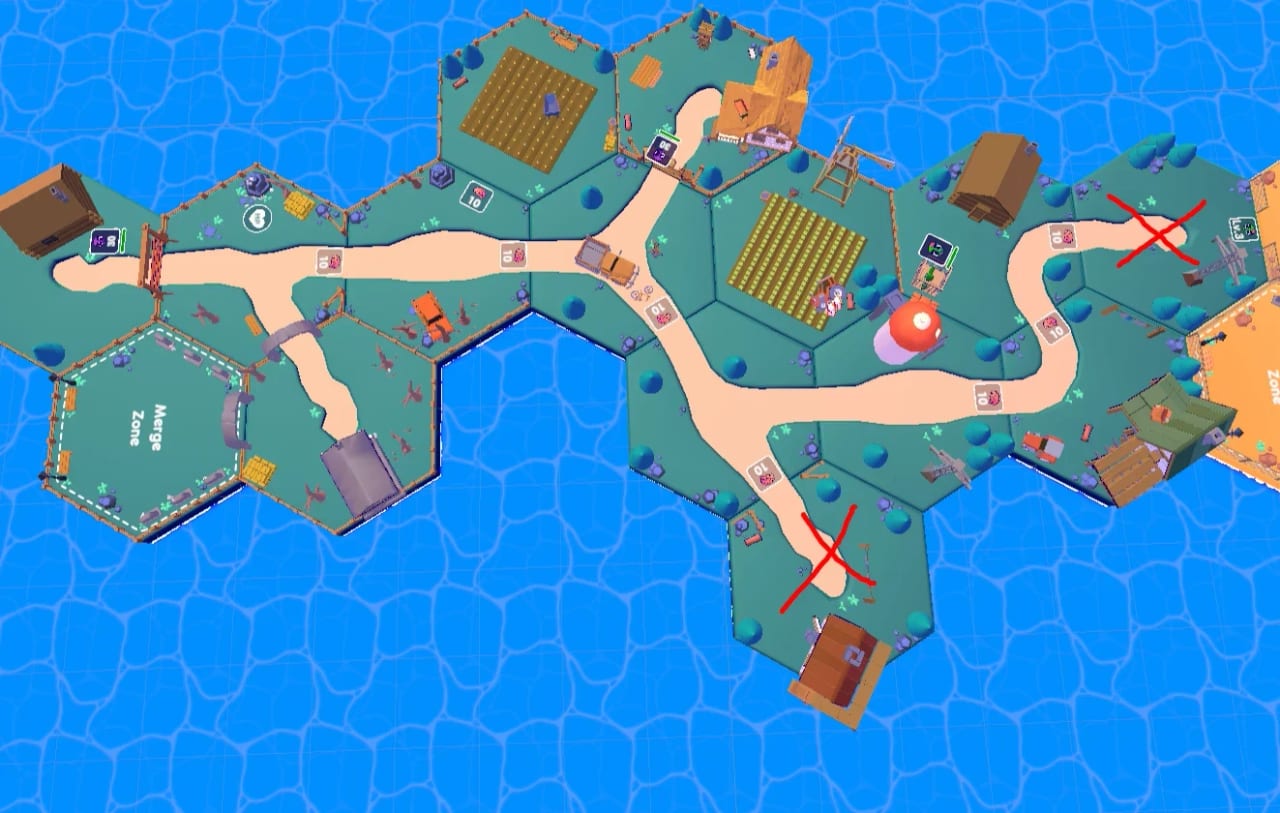
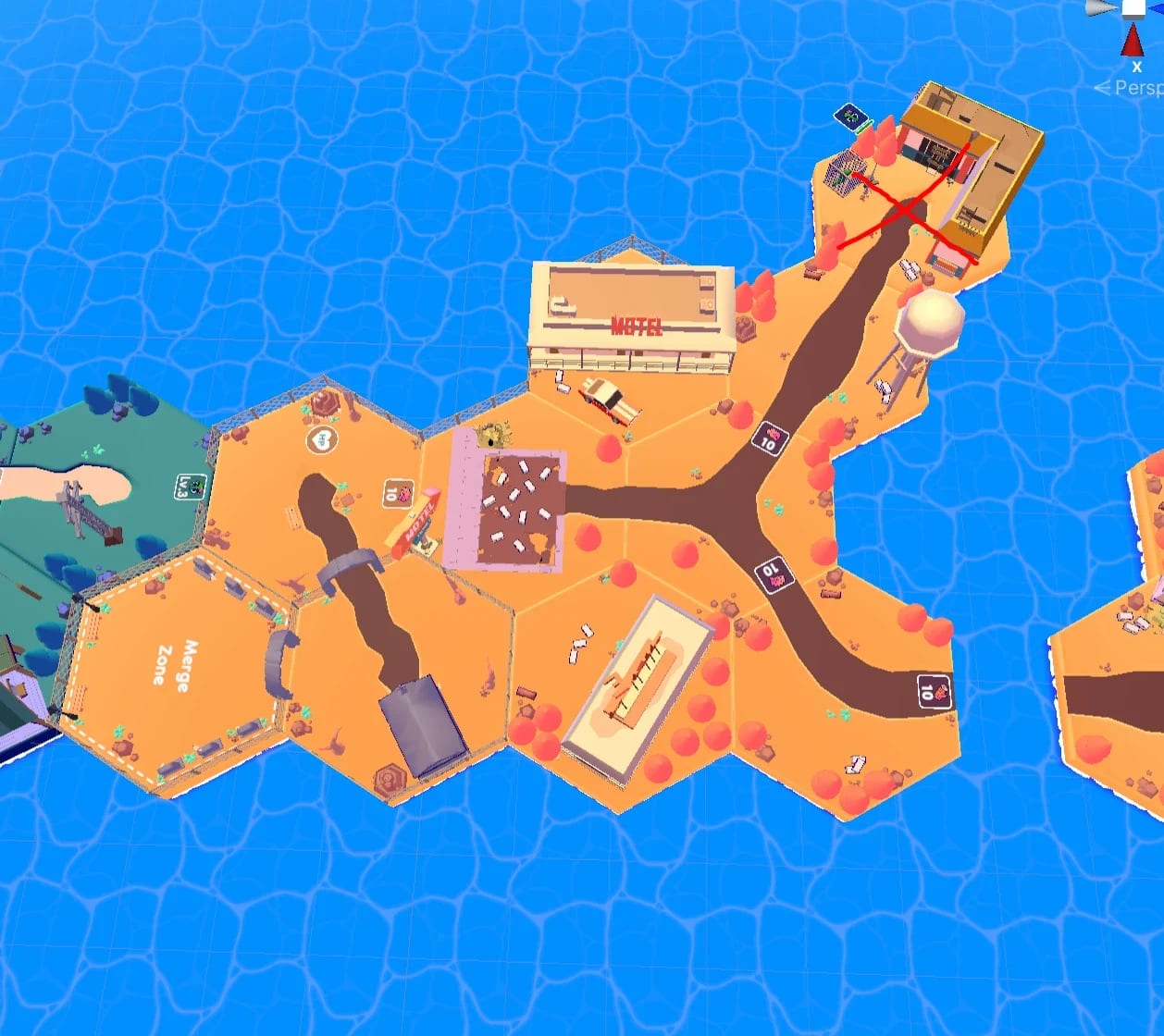
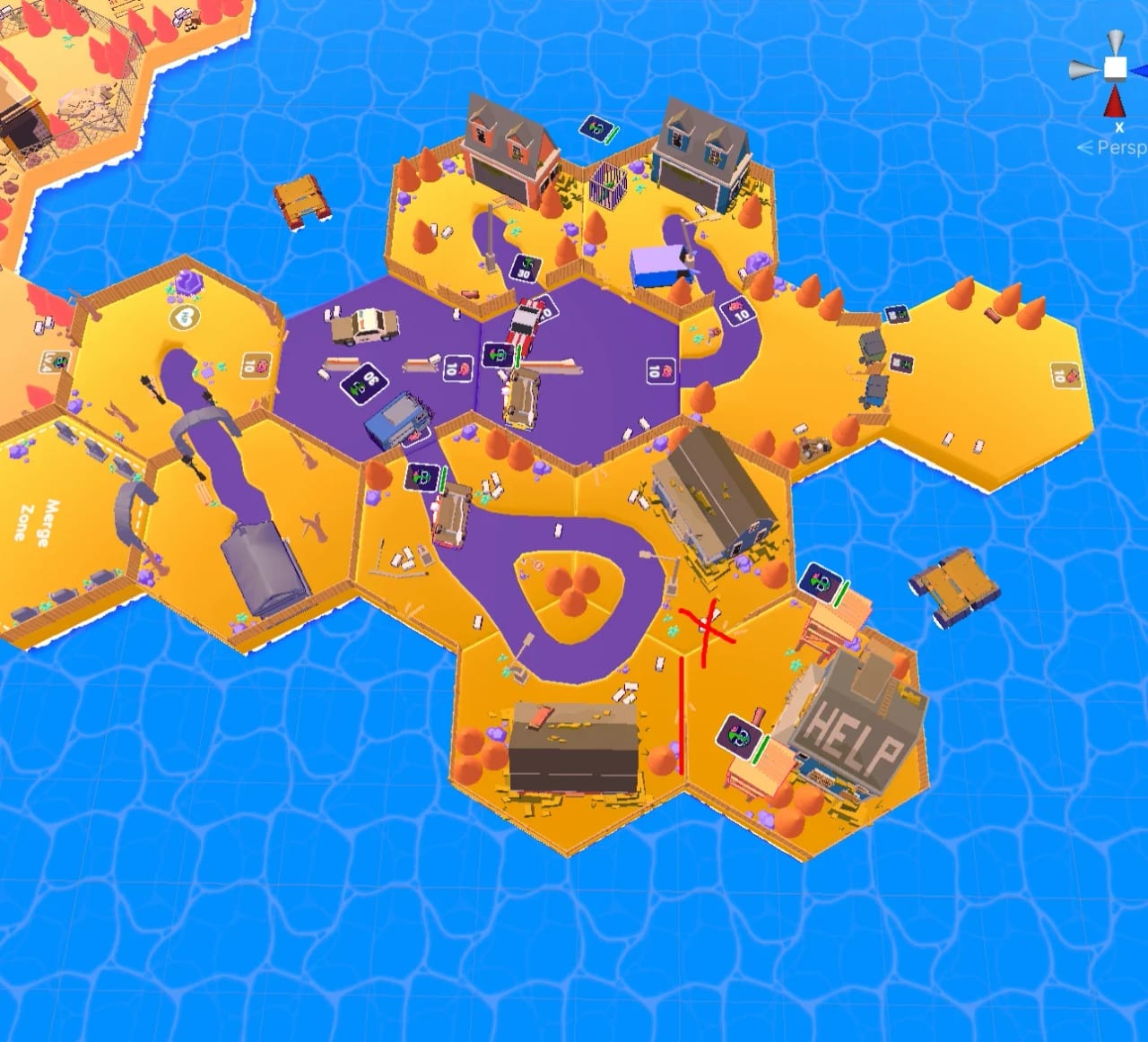
Farm hex areas with fields, houses and the paths between them

Purpose

The world is split into hexagonal areas, and the goal in each one is to infect every human in it. Brains pay to open the next area, barriers ask for a horde big enough to push them and wood builds the bridges that close some paths. Every element of the scene was placed to populate the layout, with humans, resources, traps and healing zones spread so the horde always has a next target in sight. When a bridge asks for more wood than an area holds, the way forward runs back through areas the player already cleared.
Design Goal

  • Give the horde a next target in sight from every point of the map
  • Make brains and horde size the two keys that open the way forward
  • Bring players back to cleared areas when they need more wood
  • Keep humans, resources and traps easy to read across the whole map

Key Areas

  1. 01 Starting IslandWhere Zé bites his first human
  2. 02 Hex AreasUnlocked with brains
  3. 03 Human GroupsBrains and new zombies
  4. 04 BarriersRocks and cars the horde pushes
  5. 05 BridgesBuilt with wood to open paths
  6. 06 Wood PilesThe resource for bridges
  7. 07 TrapsCost the horde a few zombies
  8. 08 Healing ZonesAt the entrance of new levels
  9. 09 GraveyardThe Merge Zone of the horde
  10. 10 Map WeaponsBricks zombies throw at humans

Feature Breakdown

What fills each area

01 Hex AreasOpened with brains, cleared by biting
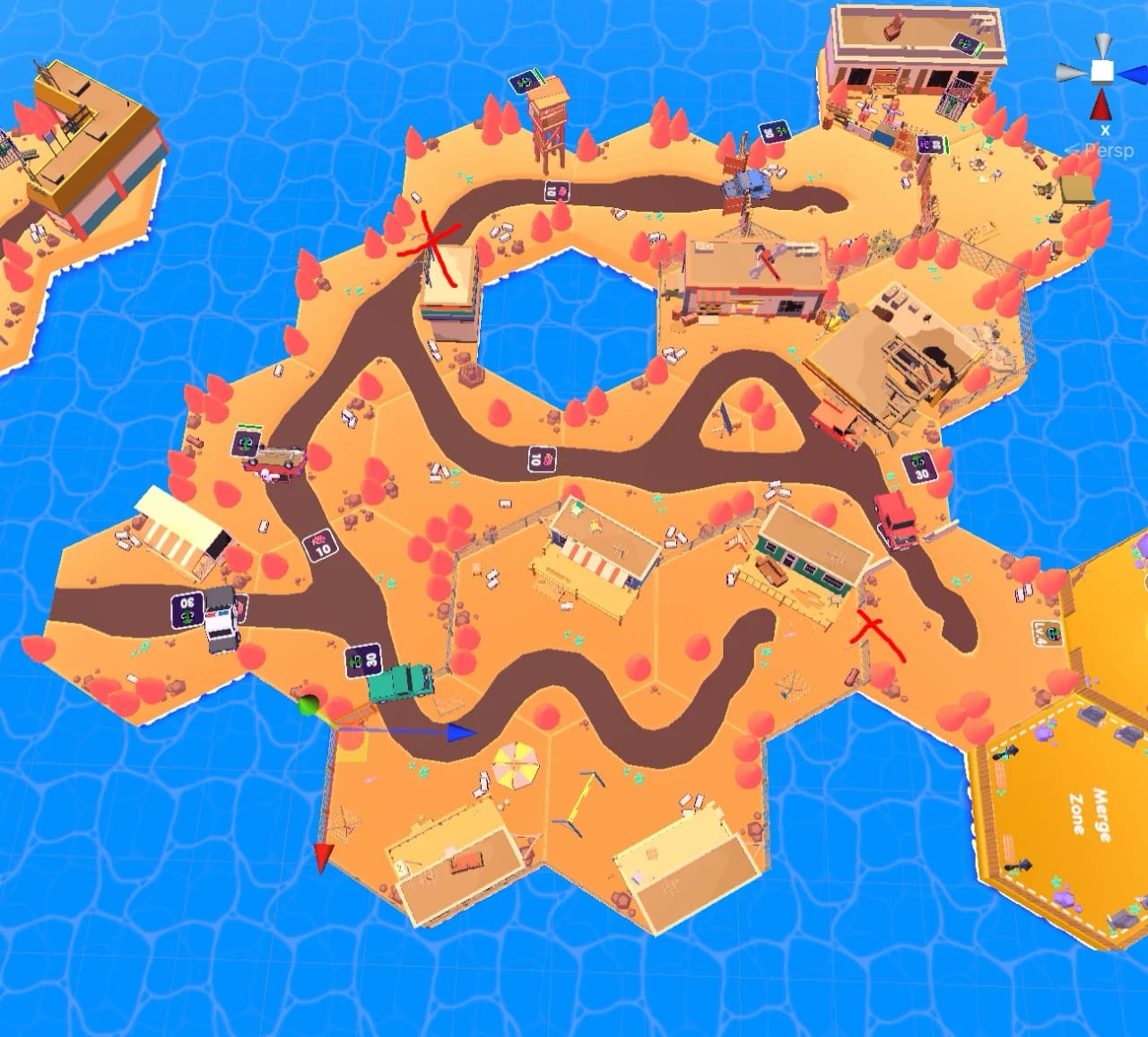
A ring of desert hex areas around the water, linked by roads
01

Hex Areas

Opened with brains, cleared by biting

Each hexagonal area is a closed piece of the world with its own humans to infect. Opening the next one costs a set amount of brains, so every human bitten brings the next area closer. Stronger humans wait deeper into the map, with guns, bazookas and tanks, and infecting every area is the goal of the game.

Function

Make every bite a step toward conquering the next part of the map

Design Approach

Decisions made:

  • Populate every hexagonal area with humans, resources and traps in reach
  • Place humans in groups the horde can reach one after another in each area
  • Place the stronger humans, with guns and tanks, deeper into the map
  • Tune the level design parameters of every area for a steady advance

Player Impact

Allowed players to...

  • Bite their way toward the brains that pay for the next hexagonal area
  • Hunt down the last human of an area to clear it and open the way on
  • Grow the horde first, then push deeper toward the stronger, armed humans
  • Move the horde from one fight to the next as each group of humans falls
02 Horde BarriersObstacles only a big enough horde can move
02

Horde Barriers

Obstacles only a big enough horde can move

Rocks, cars and other objects block the way, and each one asks for a set number of zombies to push it. The size of the horde is its strength, so every barrier sets a clear goal, bite more humans and come back bigger. Barriers stand on the paths between areas, so the horde grows before it moves on to the next.

Function

Make the size of the horde the key that opens every way forward

Design Approach

Decisions made:

  • Place barriers on the paths that lead to new areas and their resources
  • Set how many zombies each barrier needs before the horde can push it
  • Use objects that read as obstacles at a glance, like big rocks and cars
  • Make the whole horde push each barrier together, as one single force

Player Impact

Allowed players to...

  • Know exactly how big the horde must grow before each barrier gives way
  • Leave a barrier for later and come back once the horde has grown enough
  • Feel every zombie they added as the whole horde pushes the barrier as one
  • See how strong they have become as the horde shoves a car out of the way
03 Bridges & WoodWood to build, and a reason to go back
03

Bridges & Wood

Wood to build, and a reason to go back

Wood lies across the map, and bridges built with it open paths that were closed. When a bridge asks for more wood than the current area holds, players go back to areas they already cleared, where paths that were closed before now lead somewhere new, so going back becomes a way to discover more of the map they thought they knew.

Function

Bring players back through the map to open the paths left closed

Design Approach

Decisions made:

  • Spread piles of wood across every area of the map, on and off the path
  • Close some paths until a bridge is built from the wood the horde collects
  • Make some bridges ask for wood from areas the horde already cleared
  • Open new routes through old areas once a bridge is finally built

Player Impact

Allowed players to...

  • Collect every pile of wood they pass, knowing the next bridge will need it
  • Go back to cleared areas when a bridge asks for more wood than they have
  • Find something new in old areas, where closed paths now lead somewhere
  • Spot the wood from far away and plan their route straight to each pile
04 TrapsDangers that cost the horde zombies
04

Traps

Dangers that cost the horde zombies

Traps across the map take a few zombies from the horde when it runs over them. They make the route matter, since the horde is the strength of the player, and losing part of it means more humans to bite before the next barrier. Players learn to read the traps and steer the horde around them.

Function

Make every route of the horde a choice with a real cost in zombies

Design Approach

Decisions made:

  • Place traps along the paths the horde takes through each area of the map
  • Make each trap take a few zombies from the horde when it runs over it
  • Keep every trap visible on the ground well before the horde reaches it
  • Use the traps to give every route of the horde through the map a cost

Player Impact

Allowed players to...

  • Steer the horde around the traps with care to keep every zombie they have
  • Watch the path ahead, since a careless route shrinks the horde fast
  • Protect the horde, since every zombie lost delays the next barrier ahead
  • Keep a bigger horde by reading the traps before the horde runs over them
05 Healing ZonesRecovery at the door of a new level
05

Healing Zones

Recovery at the door of a new level

Healing zones sit across the map, mostly at the entrance of new levels. The horde recovers there before it faces stronger humans, so each new level starts with a healthy horde and a fair fight. The zones also mark the start of a level, a safe place to regroup before pushing into the humans waiting ahead.

Function

Give the horde a safe spot to recover before each new level begins

Design Approach

Decisions made:

  • Place healing zones at the entrance of every new level, before the humans
  • Add more healing zones along the way between the hexagonal areas
  • Make each healing zone read as a safe place at a glance, from far away
  • Use the healing zones to mark where each new level of the map begins

Player Impact

Allowed players to...

  • Start every new level at full strength after healing right at its entrance
  • Push harder on the way there, knowing a safe healing zone waits up ahead
  • Feel their progress across the map each time they reach a new healing zone
  • Regroup in safety before facing the stronger humans of the next level
06 Map WeaponsBricks and other items that make zombies stronger
06

Map Weapons

Bricks and other items that make zombies stronger

Some elements of the map make a zombie stronger. A zombie that picks up a brick throws it at the humans, hitting from a distance before the horde reaches them. These items turn the map into part of the fight, so players look around each area for anything the horde can use against armed humans before they attack.

Function

Turn the map itself into part of the fight against armed humans

Design Approach

Decisions made:

  • Place items like bricks across each area of the map for zombies to pick up
  • Make a zombie holding a brick throw it at the humans from a distance
  • Spread the items across every area so there is always one more to find
  • Make the items easy to spot on the ground among the colorful scenery

Player Impact

Allowed players to...

  • Arm the horde before a fight and hit the humans from a safe distance
  • Look around each area for anything the horde can use before attacking
  • Turn the area itself against armed humans, from guns to bazookas and tanks
  • Plan each fight around the bricks and items they pick up along the way

Wayfinding

How an area guides the horde

01 Reading an AreaShow from far away what each area asks for, and leave a landmark wherever players will need to come back.

Reading an Area

Show from far away what each area asks for, and leave a landmark wherever players will need to come back.

Every hexagonal area shows what it asks for before players get close. Barriers show how many zombies it takes to push them, locked areas show their cost and beams of light mark the resources waiting. Landmarks sit near the places players need to find again, since a small horde often means going back for more zombies.

Focus

Read the cost before the walk.

Weigh the horde against the barrier, or go back for more zombies.

Costs at a glance

Barriers show the zombies needed to push them and locked areas show their cost, both readable from far across the map.

The way back

Landmarks sit next to the places players return to, so they remember the route when they come back with more zombies.

What players read

Barrier Cost

Barriers

Each barrier shows the zombies it takes to push it, so players know if the horde is big enough.

Area Cost

Locked Areas

A locked area shows the resources it costs to open, so every human bitten brings the next area closer.

Resources

Light Beams

Beams of light over brains and wood show from far away where a resource is still waiting.

Way Back

Landmarks

Landmarks near the spots to come back to help players remember the way back for more zombies.

Impact

How the map shapes each run

  • Sweep

    Every human is a brain and a new zombie, so players sweep each area and leave no human behind before moving on to the next.

  • Grow

    A barrier shows the horde it asks for, so players bite more humans until the horde is big enough to push it out of the way.

  • Return

    A bridge that needs more wood sends players back to cleared areas, where closed paths now lead somewhere new.

  • Steer

    Traps cost zombies, so players steer the horde around them and protect the strength they worked to build before the next barrier.

Horde & Progression

Feature Introduction

A horde that grows, merges and rules

The horde is the heart of My Zombie World. Every human bitten joins it as a zombie and drops a brain, so one bite makes the horde bigger and pays for what comes next, and the number of zombies is the strength that pushes barriers and wins fights.

Size is only half of it. At the graveyard, the Merge Zone, pairs of zombies fuse into one of the next level, so players choose between a bigger horde that pushes barriers and a stronger one that wins fights, and four zombies of the first level become two of the next, taller, stronger and dressed for their new rank in the horde.

Zé leads the horde and grows with it. Leveling him up costs brains and zombies of a higher level, so the leader competes with new areas and merges for the same resources, and every level he gains shows on his body as a trophy the whole horde can see. The HUD keeps zombies, brains and wood, the three numbers of the game, always in view.

Design Principles

  • The horde is the strength of the player, so its size decides what the player can push, open and fight at every moment of the game
  • The horde has to look as strong as it is, so every merge and every level up changes how the zombies and Zé look on screen
  • Zé shows his power on his own body, gaining a new accessory with every level until a crown on his head finally marks him as king of the horde
  • Lost zombies across the map are worth finding, since every zombie rescued joins the horde and adds to its strength right away, before the next fight

Feature Breakdown

What makes the horde stronger

01 BrainsThe currency every bite pays
01

Brains

The currency every bite pays

Every human bitten drops a brain, the one currency of the whole game. Brains pay to open new hexagonal areas and to level Zé up, so each bite is progress on two fronts, and every brain spent is a choice between going further into the map and making the horde's leader stronger before the next fight with armed humans.

Function

Make every bite pay for new areas and for the growth of Zé alike

Design Approach

Decisions made:

  • Make each brain pay toward two goals, new areas and a stronger Zé
  • Show the brain count on the HUD at all times, next to zombies and wood
  • Design the brain icon in the same colorful language as the whole UI
  • Place the humans so new brains keep coming as the horde advances

Player Impact

Allowed players to...

  • Collect every brain before moving on, even one left far away in a fight
  • Know at a glance when they can afford the next area or a stronger Zé
  • Weigh a new area against a stronger Zé with the brains they have on hand
  • Go after every human they can reach, knowing each bite pays a brain
02 Horde StrengthThe number of zombies is the power
02

Horde Strength

The number of zombies is the power

The number of zombies in the horde is the strength of the player. Barriers ask for a set number of zombies to move, and a bigger horde overwhelms humans faster. Lost zombies wait across the map, and rescuing them adds to the horde, so the count on the HUD is the number players watch the most.

Function

Make the size of the horde the one measure of the player's power

Design Approach

Decisions made:

  • Place lost zombies across the map as a reward for exploring each area
  • Show the zombie count on the HUD at all times, as the measure of power
  • Add an arrow on the HUD that opens the count of every level in the horde
  • Place barriers on the way that only a big enough horde can push aside

Player Impact

Allowed players to...

  • Explore every corner of an area to bring lost zombies back to the horde
  • Know which barriers they can push from the zombie count always on screen
  • Plan their next merge from the count of every level of zombie in the horde
  • Bite every human they can find to grow the horde for the next barrier
03 Merge ZoneTwo zombies in, one stronger zombie out
03

Merge Zone

Two zombies in, one stronger zombie out

The graveyard is the Merge Zone. When the horde walks in, every zombie inside fuses two by two into a zombie of the next level, taller, more muscular and in a new color. Clothes change with the merge too, so a merged zombie stands out from the rest of the horde, and players see at once what they gained.

Function

Let players trade the size of the horde for fewer, bigger zombies

Design Approach

Decisions made:

  • Merge zombies two by two at the graveyard, trading numbers for power
  • Place the merge in the world, at a graveyard the horde walks into
  • Let a single merge transform the whole horde inside the zone at once
  • Tune the materials so a merged zombie stands out in the horde at once

Player Impact

Allowed players to...

  • See at once what a merge gave them through the new color and clothes
  • Trade numbers for power at the graveyard and watch the horde get stronger
  • Spot the strongest zombies of their horde right before a hard fight starts
  • Decide when to merge, weighing a bigger horde against a stronger one
04 Zé Level UpA leader who shows his power
04

Zé Level Up

A leader who shows his power

Zé is the zombie players control, and he levels up with brains and zombies of a higher level. Every level shows on his body. He starts as a plain zombie, gains a lab coat, then glasses and, at the top level, a crown with the brain showing, so any player can tell at a glance how strong their leader has become.

Function

Make the leader's growth visible on his own body at every level

Design Approach

Decisions made:

  • Model a new accessory on Zé for every level, from a lab coat to the crown
  • End the line with a crown showing the brain, marking the king of the horde
  • Keep Zé readable inside the horde with a look of his own at every level
  • Match every accessory to the colorful materials of the rest of the game

Player Impact

Allowed players to...

  • Push for the next level just to see the next accessory appear on Zé himself
  • Tell at a glance how strong their leader has become, from coat to crown
  • Aim for the crown from the very first level, to become the king of the horde
  • Find Zé at once inside the horde, even in the middle of a crowded fight

Behind the Feature

How the merge was built

01 Merge ZoneTwo by two · Size versus power · Graveyard · Visible tiers

Goal

Trade the size of the horde for its power

  • Make players choose between a bigger horde and a stronger one
  • Make every merged zombie look as strong as it is, at a glance in the horde
  • Place the choice in the world, where the horde simply walks in, with no menu

Constraints

Size still matters after every merge

  • Keep barriers that ask for a number of zombies, so size never loses value
  • Keep fights where a stronger horde wins, so merging always has a purpose
  • Show the count of every level in the horde without crowding the small HUD

Process

  1. A graveyard as the zone The merge happens at the graveyard, a place the horde walks into near the areas that ask for strength, so merging is a move on the map and the player picks the right moment to go.
  2. Two by two Every zombie inside fuses two by two into one of the next level, so four zombies of the first level become two of the second, halving the count in exchange for power.
  3. Barriers against fights I listed every barrier and armed group of each area with the horde size or level it asks for, so the map always offers a reason to stay big and a reason to merge.
  4. A new look per level Each level comes out taller and more muscular, in a new color and new clothes, and the HUD opens the count of every level, so the gain and the cost of each merge read at once.

The decision that made it work

Make the merge cost numbers

Halving the count for a level up turned every merge into a real trade, since barriers ask for many zombies while fights reward stronger ones. Players had to read the next obstacle before deciding to walk into the graveyard.

Result

Every merge became a plan for the next area

Players merged before fights with armed humans and kept a big horde for barriers, so the graveyard became a place they returned to with a plan, and the horde on screen always showed what they had chosen.

Impact

How the horde shapes each run

  • Bite

    Every bite adds a zombie and a brain, so players go after every human to grow the horde and earn at the same time.

  • Rescue

    Lost zombies wait across the map, so players explore every corner of an area to bring them back into the horde.

  • Merge

    The Merge Zone turns pairs into stronger zombies, so players go back to the graveyard to trade numbers for power.

  • Lead

    Every level shows on Zé, so players push for the next one to see him gain a new accessory and, at last, the crown.

Development

Development

Tech Art & Optimization

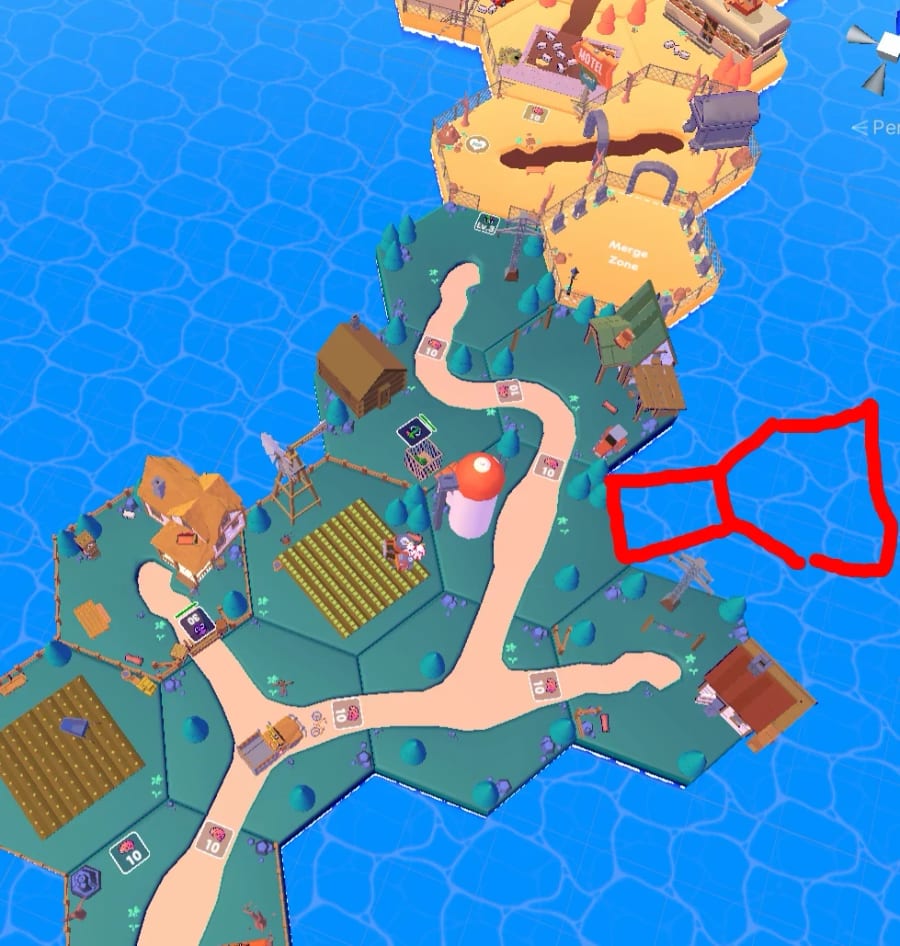
Farm hex areas with fields, houses and the paths between them

Level layout, farm areas

Farm hex areas in the editor.

Conclusion

Conclusion

Design Conclusions

My Zombie World was my first job on a game already in production. Most of my work was visual, and it taught me a lot about highlight, how materials, outlines and a careful division of colors decide what stands out, so players read a zombie, a human or a resource in one look on screen.

It also showed me that on mobile a visual rework and optimization are the same job. Every color and effect I added had to fit the phone, and lighter models and grouped scenes kept a big horde and full areas on screen without giving up any of the colorful look that made the game stand out.

Design Takeaways

  • Improving a game in motion

    I joined My Zombie World halfway, so every change had to fit a game players already knew. Testing first and reworking only what did not work became my way into a running project.

  • One rule per signal

    Red for enemies, black for allies and light over every resource. Giving each signal one rule that never changes let players learn it once and read every fight after that.

  • Optimize with the team

    Occlusion culling and grouped scenes came from working with the 3D team and the programmer, so performance became a shared job and a colorful world stayed smooth on phones.

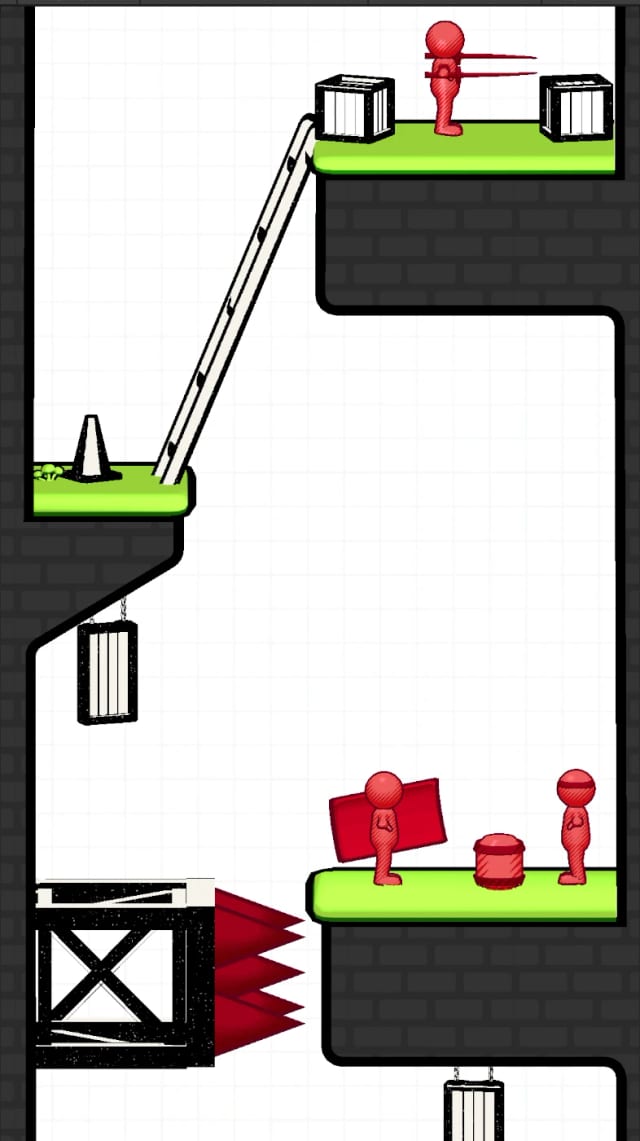
A vertical sketchbook level with red enemies on green platforms, crates, a ladder and red spikes

Next project

Ninja Kunai

A 10M+ download ninja hit rebuilt as a white-label template, then remade as a sketchbook drawn in ink.