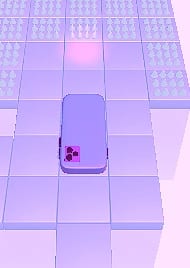

Back to Projects
Project 09 / 15

Project 09 · Game

Flip Phone

A hyper-casual puzzle game where you swipe to roll a phone over its faces and corners to its charger.

  • Hyper-Casual
  • Puzzle
  • Mobile
  • Games
Genre:
Puzzle, Hyper-Casual
Scope:
Level Design · Game Feel · 3D & Materials · Art Direction
Development Time:
1 Week
Team Size:
2
Tools:
Unity
Flip Phone gameplay
0:00 0:00

Project Resume

Project resume

01

Overview

A hyper-casual puzzle game. Players swipe to roll a phone forward, sideways or over its corners, and solve each of the twelve levels by bringing it to its charger.

  • Platform Mobile
  • Team Size 2
  • Duration 1 Week
  • Engine Unity

Key Features

  • Swipe to roll the phone in every direction
  • Roll over faces and corners to reach the charger
  • Twelve puzzle levels, each with more than one solution
  • Every level solvable in two minutes at most
  • Four worlds, a new scenery every three levels
  • A curved world and a phone with a face

My Role

Game Designer & Unity Artist

Designed all twelve levels, made the art from models to lighting, coordinated the programmer and set the game's direction.

  • Designed every level and its constraints
  • Made the 3D, materials, lighting and post
  • Tuned the swipe and added the juice
  • Level Design
  • Puzzle Design
  • Game Feel
  • 3D & Materials
  • Lighting
  • Art Direction
02

Design Brief

Flip Phone was a hyper-casual puzzle game at 67 Bits, my second game at the studio after The Merging Thief, built in one week in Unity. The brief came with clear constraints for every level, and the art direction had to be approved by the studio owner, who was also the main art director.

Constraints

  • One weekFrom the first paper sketch to the finished game in just one week, in Unity.
  • Many solutionsEvery puzzle needed more than one way to roll the phone to its charger.
  • Two minutesEvery level had to fit a short session, solvable in two minutes at most.
  • Easy to finishPuzzles reasonably easy for a hyper-casual audience.
03

Design Goal

The puzzles had to be open and easy at once, with more than one solution and still complete by instinct in under two minutes. The swipe was the whole game, so it had to feel comfortable from the first touch, and every roll needed a reaction that made the phone feel alive on its whole way to the charger.

From the first swipe to the charger

Swipe. Roll. Charge.

  1. SwipeSwipe in the direction you want to go.
  2. RollRoll over its faces and corners along the path.
  3. ChargeReach the charger and move on to the next level.

Player Experience Pillars

  • Open puzzlesMore than one way to the goal.
  • Quick levelsTwo minutes at most.
  • InstinctiveThe next roll reads at a glance.
  • A natural swipeComfortable on the first try.
  • A phone with lifeEvery roll gets a reaction.
04

Design Solution

I designed twelve levels around where each roll lands, with every path readable from the phone's position and more than one route to the charger. I worked the puzzles out on paper, built and tested many versions, tuned the swipe's speed and distance until it felt natural, and gave every roll juice and a face that reacts. A new scenery every three levels and a look bent by Curved World gave the game an identity of its own among hyper-casual puzzles.

Key Design Choices

  • Twelve levelsDesigned every level around where each roll lands, with more than one route from the start to the charger.
  • Paper firstWorked out the puzzles on paper, then built and tested versions until they read by instinct.
  • A tuned swipeTested the swipe's speed and distance until every gesture felt comfortable.
  • Juice and a faceAdded squash and stretch, a green glow at the charger, a shock and a ragdoll on death, and a reacting face.
  • Four worldsChanged colors, textures and sky every three levels, bent by Curved World.
05

World & Visual Identity

A clean, colorful puzzle world for small screens, where a little phone with a face rolls toward its charger. Every three levels the scenery changes in colors, textures and sky, and Curved World bends the levels to give the game a look of its own.

Visual Principles

  • Four worldsA new scenery every three levels.
  • A phone with a faceRed when hurt, X eyes when it dies.
  • Curved WorldLevels that bend toward the horizon.
  • Made for phonesClear shapes and colors on a small screen.
  • The studio's lineApproved by the studio's art director.
06

Results & Learnings

Results

  • Twelve levels in a weekDesigned and built all twelve puzzle levels in one week, with the art, the lighting and the juice of the whole game.
  • Open and quickEvery puzzle kept more than one solution and stayed solvable in under two minutes, as the constraints asked.
  • About 2K downloadsReached about 2K downloads, and the publisher used it in development and marketing tests to see if the idea was worth a full game.

Learnings

  • Paper is a design toolSketching levels on paper showed which layouts could hold several solutions before building any of them.
  • Test the one gestureWhen a game has a single input, its feel decides everything, so the swipe needed as much testing as any level.
  • Open and instinctiveA puzzle can have many solutions and still feel easy, but only after building and playing many of its versions.

Media

The work, up close

Project gallery · 11
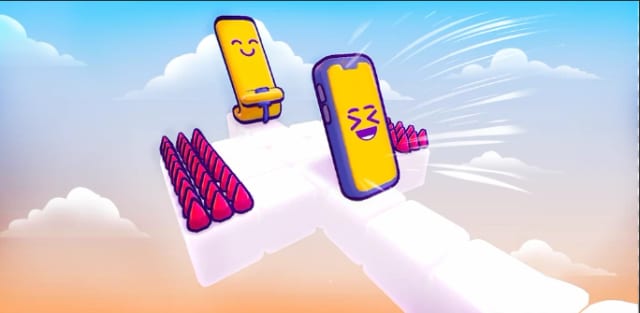
Two cartoon phones flipping over a white path past pink spikes in the sky

Play Store cover

The cover of the game on the Play Store.

Roles

Roles & Responsibilities

Level Design

  • Designed all twelve puzzle levels of the game in one week
  • Gave every puzzle more than one way to reach the charger
  • Kept every level solvable in two minutes at the most
  • Worked the puzzles out on paper before building them

Direction

  • Coordinated the programmer through every game system
  • Set the direction the game would take, from rules to feel
  • Set the art direction for the owner's approval
  • Organized the whole project to ship in a single week

Art & Lighting

  • Modeled the 3D of the phone and of every level in Unity
  • Made every material of the phone and the four worlds
  • Set the lighting and the post-processing of every world
  • Changed colors, textures and sky every three levels

Game Feel

  • Tested the swipe's speed and distance until it felt right
  • Added feedback effects to every roll and to the goal
  • Animated the little face of the phone to react to rolls
  • Bent the levels with Curved World for a look of its own

Full Case Study

Flip Phone Case Study

Core Loop

  1. Read the level
  2. Swipe to roll
  3. Tip over the edges
  4. Reach the charger

Every level is a short puzzle about one goal, getting the phone to its charger. Players read the path first, then swipe to roll the phone forward, sideways or over a corner, and each roll lands it on a new face and a new tile. Every puzzle has more than one way through and fits in two minutes, so the loop stays quick, and reaching the charger opens the next level.

Level Design

Feature Introduction

Twelve puzzles under three rules

I designed all twelve levels myself under three constraints, more than one solution, two minutes at most and a reasonably easy puzzle, because a hyper-casual player has to finish a level on instinct, in the few spare minutes they have on the go.

The phone rolls in every direction, forward, sideways and over its corners, so each level is built around where a roll lands. I shaped every path so the next move reads from the position of the phone, and placed the charger as the clear goal at the end, so players always know where they are heading before each swipe they make.

Every three levels the scenery changes, with new colors, textures and a new skybox, so the twelve levels read as four short worlds. Players see their progress in the look of each new world they reach, and the change gives a short game of twelve puzzles a sense of moving forward, even in a session of just a few short minutes.

Design Principles

  • Give every puzzle more than one solution, so players find their own way to the charger and never feel stuck on a single answer
  • Keep every level solvable in two minutes at most, so each one fits the short sessions of a hyper-casual game played in a few spare minutes on the go
  • Keep the puzzles reasonably easy and instinctive to complete, with the path readable from the phone's position before each roll it makes
  • Change the scenery every three levels, so progress is visible in the colors, textures and sky of each new world the phone rolls into

Impact

How the levels shape each roll

  • Many Ways

    Every puzzle has more than one solution, so players try their own route and a wrong roll rarely leaves them stuck.

  • Two Minutes

    No level takes more than two minutes, so each one feels like a quick win that invites the next level right away.

  • Read the Roll

    Paths are shaped around where each roll lands, so players read the next move from the phone and solve by instinct.

  • Four Worlds

    A new scenery every three levels gives players a visible sign of progress and a fresh look before the puzzles get harder.

Swipe & Feel

Feature Introduction

A swipe that feels right

The game is played with a single gesture, so the swipe had to feel right before anything else. I tested its speed and distance many times in Unity, until every gesture rolled the phone exactly the way players expected it to on the first try.

I gave every single move of the phone its own feedback. It squashes and stretches as it rolls and falls, turns green when it reaches the charger, and gives off an electric shock and drops as a ragdoll when it dies, so success and failure both read at a glance and every roll of the phone feels like it carries some real weight.

I also animated the little face of the phone so it shows how the phone is doing on every single roll. It turns red when the phone gets hurt and gets X eyes when it dies, so players read each mistake on the character itself, and a phone that started as an object became a small character they wanted to see reach the charger safely.

Design Principles

  • Make the swipe comfortable, with a speed and distance that answer the way players expect on the first try, so the puzzle stays the only challenge
  • Give every roll a visible reaction, with squash and stretch as the phone rolls and falls, so each move feels alive and every roll lands with weight
  • Turn the phone green at the charger and end a death with a shock and a ragdoll, so every outcome reads at once, at the very end of each attempt
  • Show the phone's state on its face, red when it gets hurt and X eyes when it dies, so players read each mistake at a glance and want to try the level again

Behind the Feature

How the swipe was built

01 Swipe TuningSwipe speed and distance · Squash and stretch · Face states

Goal

A swipe that rolls the phone as expected

  • Make every gesture roll the phone the way players expect on the first try
  • Keep the puzzle as the only challenge, with controls that never get in the way
  • Make every roll, success and failure read at once on the phone itself

Constraints

One gesture for every roll direction

  • Roll forward, sideways and over the corners with the very same swipe gesture
  • Keep each roll readable on a small vertical screen, with no arrows or hints
  • Give an object with no arms or legs a clear way to show how it is doing

Process

  1. Swipe thresholds I tested the speed and distance of the swipe many times in Unity, setting how short and how fast a gesture can be before it counts as a roll in each direction, so a tap never moves it.
  2. Direction from the angle The angle of the swipe picks the roll among forward, sideways and over a corner, with margins tuned so a slightly crooked gesture still rolls the way it was meant.
  3. Weight and end states The phone squashes and stretches as it rolls and falls, turns green at the charger and drops as a ragdoll with a shock when it dies, so each outcome reads at once.
  4. A face that reacts I animated the little face of the phone, red when it gets hurt and with X eyes when it dies, so each mistake reads on the character itself, and players want to try again with it right away.

The decision that made it work

Tune the swipe before any level

Since the whole game is one gesture, the swipe was tuned first and every level was built on top of it. A roll that always answers as expected leaves the puzzle as the only challenge, so a failed level is always the player's plan.

Result

A phone players wanted to see succeed

Players rolled the phone with confidence from the first level, read every mistake on its face and its color, and an object that started as a phone became a small character they wanted to bring safely to the charger in every level.

Design Iterations

01 The SwipeOne gesture that felt right

01 The Swipe

Problem

Early swipes rolled the phone too soon or too late

In the first builds, a short flick could roll the phone before the player meant to, while a slow, careful swipe sometimes did nothing at all, so players blamed the controls instead of their own moves on the puzzle.

Cause

One fixed threshold for every kind of swipe

The game read every swipe with the same distance and speed, so quick flicks and slow, careful drags were judged by one rule that fit neither of them.

Solution

Tested speed and distance over and over

The gesture had to be read the way players mean it. Speed and distance were tuned together, over many tests, so a quick flick and a careful drag both turn into the roll the player had in mind, on any part of the screen.

  • Test how fast a finger has to travel on the screen before the phone rolls
  • Test how far a finger has to travel on screen before the phone starts to roll
  • Keep the speed and distance values that felt the most natural to players

Result

One gesture that felt right

The controls disappeared into the puzzle. Once the roll always matched the finger, every mistake belonged to the player's own plan, which is what a puzzle game needs to feel fair from the first level.

  • The swipe became comfortable and predictable for every player
  • The phone rolled exactly the way the player's finger told it to roll
  • Players kept their focus on the puzzle instead of on the swipe
02 Puzzles on PaperTwelve levels that read by instinct

02 Puzzles on Paper

Problem

Early levels had a single way to the charger

The first layouts, built straight in Unity, tended to have one right route, so a player who missed it was stuck with nowhere else to go, and the level broke its own rule of more than one solution in under two minutes.

Cause

Rolls are hard to picture on screen

Each roll changes the phone face and position at once, so it was hard to see in the editor which layouts allowed several different routes.

Solution

Worked out every level on paper before building and testing it in Unity

A roll changes face and position at once, which is easier to reason about on paper than in an editor. Designing on paper first made the other routes visible, and Unity became the place to prove each of them in actual play.

  • Work out every level on paper first, before building a single one in Unity
  • Implement many versions of every layout in Unity and play each of them
  • Keep only the layouts that held several solutions and still felt instinctive

Result

Twelve levels that read by instinct

The twelve levels kept the promise of the game, more than one answer in under two minutes, so a player who missed one route always had another one to try, long before any frustration with the puzzle could set in.

  • All twelve levels kept more than one solution from start to finish
  • Every level stayed quick and easy to finish, in under two minutes
  • Working on paper became a lasting part of how I design puzzles

Art & Worlds

Feature Introduction

Four worlds, one look

I set the art direction of Flip Phone and took each step to the studio owner, the main art director of the studio, for approval before building it, so the look was settled early in a project that took only one week from start to end.

I made the 3D models of the phone and the levels, every material, the lighting and the post-processing myself in Unity. Owning every piece let me keep the shapes, colors and light consistent across the four worlds and clear on a small screen, where the phone, the path and the charger all have to read at a glance in every level.

I built the palette, textures and skybox of each world myself, and bent every level toward the horizon with Curved World, a touch that gave the game a look of its own among the many hyper-casual puzzle games in the store, and made each small level feel like part of a larger world that curves away out of sight past the screen.

Design Principles

  • Keep one art direction across all four worlds, approved by the studio owner, so the whole game reads as one look on a small screen
  • Keep shapes, colors and light clear on a small screen, so the phone, the path and the charger read at a glance in every level of all four worlds
  • Give each of the four worlds its own palette, textures and skybox, so the progress of players shows in the look of the game
  • Use Curved World to bend the levels toward the horizon and give the game a look of its own among the many hyper-casual puzzles of the store

Impact

What the art changes in play

  • Clear Path

    Clean shapes and strong light separate the phone, the tiles and the charger, so players read the level before the first swipe.

  • Visible Progress

    A new palette and sky every three levels tells players they moved forward, and gives each new set of puzzles a fresh start.

  • A Living Phone

    The face reacts to every roll and turns red when hurt, so moving the phone feels like guiding a character that is alive.

  • Its Own Look

    Curved World bends the levels toward the horizon, so the game stands apart from other hyper-casual puzzles at first glance.

Development

Development

Levels, Models & Materials

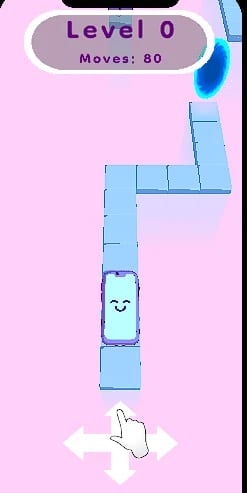
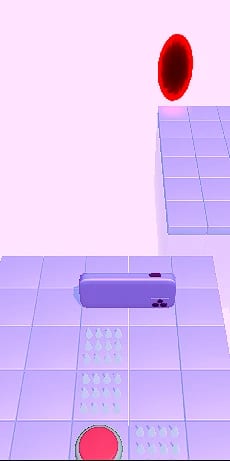
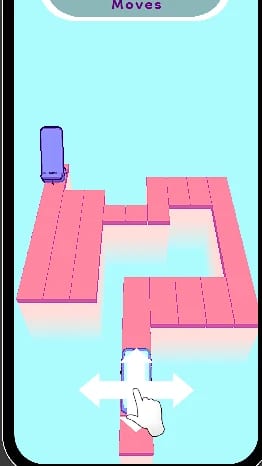
A phone on a path of blue tiles with a swipe hint below

Level 0

An early level with the move counter and the swipe hint.

Conclusion

Conclusion

Design Conclusions

Flip Phone was my second game at 67 Bits, built in one week right after The Merging Thief. I designed all twelve levels, made the art from the 3D models to the lighting, coordinated the programmer and tuned the one gesture the whole game depends on.

The biggest lesson came from the puzzles. Paper became a real design tool, and testing many versions was the only way to find levels that hold more than one solution and still feel instinctive to complete.

Design Takeaways

  • Constraints as a test

    Three rules for every level, more than one solution, two minutes at most and an easy finish, gave me a test for each layout, so a level that failed one of them was cut or redrawn on paper fast.

  • Make mistakes readable

    A red face, X eyes, a shock and a ragdoll showed every mistake on the phone itself, so players understood what went wrong and tried again without reading a single word of text.

  • Directing for approval

    Taking each art step to the studio owner early kept the look moving in a one-week project, and taught me to direct the art inside a studio's own direction and its line of games.

Next project

RKT Simulator